Smart accounts
Create and manage smart accounts for your users with just a few lines of code, using Embedded Wallets smart accounts. Smart accounts offer enhanced control and programmability, enabling powerful features that traditional wallets can't provide. Key features include:
- Gas abstraction: Cover transaction fees for users, or allow users to pay for their own transactions using ERC-20 tokens.
- Batch transactions: Perform multiple transactions in a single call.
- Automated transactions: Allow users to automate actions, like swapping ETH to USDT when ETH hits a specific price.
- Custom spending limits: Allow users to set tailored spending limits.
Embedded Wallets smart accounts are powered by the MetaMask Smart Accounts kit, so you can create and manage ERC-4337 compatible smart accounts using your preferred libraries like viem, ethers.js, and Wagmi.
For more about ERC-4337 and its components, read this blog post: An ultimate guide to Web3 Wallets.
This is a paid feature and the minimum pricing plan to use this SDK in a production environment is the Growth Plan. You can use this feature on Sapphire Devnet for free.
Enable smart accounts
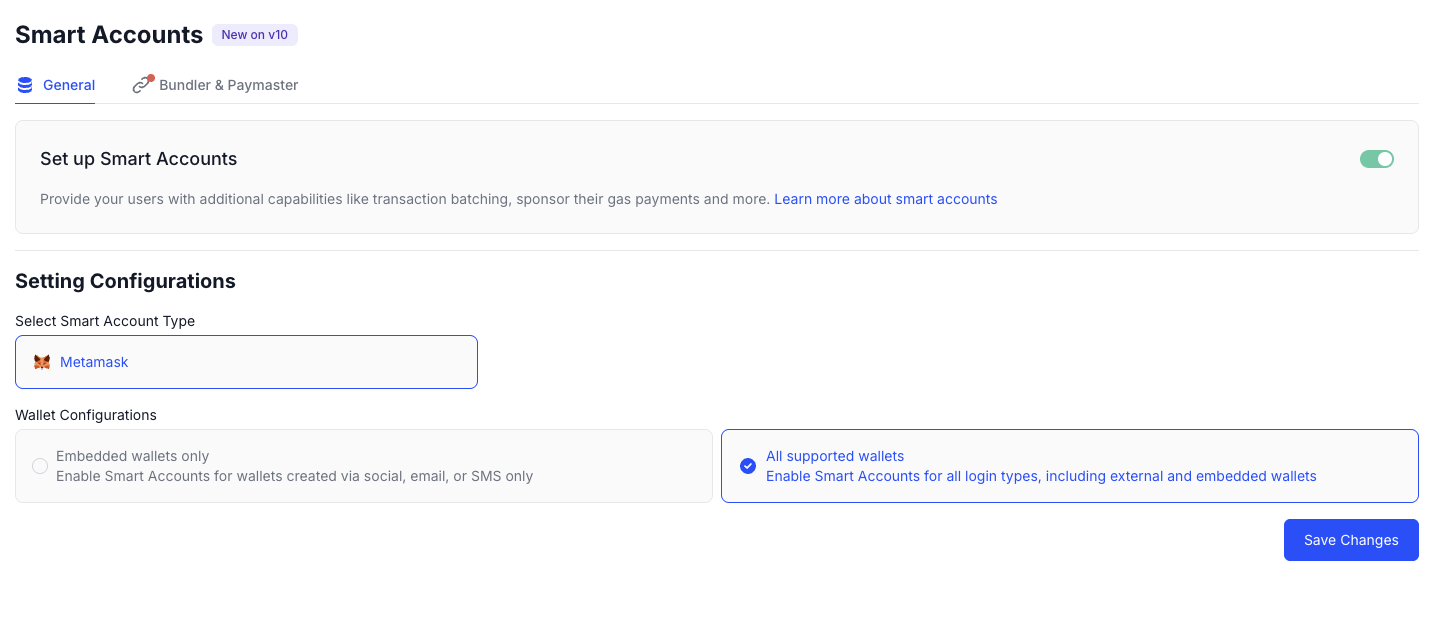
Go to the Smart Accounts section in the Embedded Wallets dashboard, and Set up Smart accounts. Embedded Wallets supports MetaMask Smart Accounts as a smart account provider.
Install the account abstraction provider
To use native account abstraction, install @web3auth/account-abstraction-provider,
which allows you to create and interact with smart accounts.
This package simplifies the process by managing the configuration of the account abstraction provider, the bundler,
and user operations.
- npm
- Yarn
- pnpm
- Bun
npm install --save @web3auth/account-abstraction-provider
yarn add @web3auth/account-abstraction-provider
pnpm add @web3auth/account-abstraction-provider
bun add @web3auth/account-abstraction-provider
Configure account abstraction
When instantiating the account abstraction provider, you can pass configuration objects to the constructor. Configure your preferred smart account provider, bundler, and paymaster.
import {
  AccountAbstractionProvider,
  SafeSmartAccount,
} from '@web3auth/account-abstraction-provider'

const chainConfig = {
  chainNamespace: CHAIN_NAMESPACES.EIP155,
  chainId: '0xaa36a7',
  rpcTarget: 'https://rpc.sepolia.org',
  displayName: 'Ethereum Sepolia Testnet',
  blockExplorerUrl: 'https://sepolia.etherscan.io',
  ticker: 'ETH',
  tickerName: 'Ethereum',
  logo: 'https://cryptologos.cc/logos/ethereum-eth-logo.png',
}

const accountAbstractionProvider = new AccountAbstractionProvider({
  config: {
    chainConfig,
    smartAccountInit: new SafeSmartAccount(),
    bundlerConfig: {
      // Get the pimlico API Key from dashboard.pimlico.io
      url: `https://api.pimlico.io/v2/11155111/rpc?apikey=${pimlicoAPIKey}`,
    },
  },
})
Configure the smart account provider
Choose your preferred smart account provider. Embedded Wallets currently supports Safe, Kernel, Biconomy, and Trust.
- Safe
- Kernel
- Biconomy
- Trust
import {
  AccountAbstractionProvider,
  SafeSmartAccount,
} from '@web3auth/account-abstraction-provider'

const chainConfig = {
  chainNamespace: CHAIN_NAMESPACES.EIP155,
  chainId: '0xaa36a7',
  rpcTarget: 'https://rpc.sepolia.org',
  displayName: 'Ethereum Sepolia Testnet',
  blockExplorerUrl: 'https://sepolia.etherscan.io',
  ticker: 'ETH',
  tickerName: 'Ethereum',
  logo: 'https://cryptologos.cc/logos/ethereum-eth-logo.png',
}

const accountAbstractionProvider = new AccountAbstractionProvider({
  config: {
    chainConfig,
    smartAccountInit: new SafeSmartAccount(),
    bundlerConfig: {
      // Get the pimlico API Key from dashboard.pimlico.io
      url: `https://api.pimlico.io/v2/11155111/rpc?apikey=${pimlicoAPIKey}`,
    },
  },
})
import {
  AccountAbstractionProvider,
  KernelSmartAccount,
} from '@web3auth/account-abstraction-provider'
const chainConfig = {
  chainNamespace: CHAIN_NAMESPACES.EIP155,
  chainId: '0xaa36a7',
  rpcTarget: 'https://rpc.sepolia.org',
  displayName: 'Ethereum Sepolia Testnet',
  blockExplorerUrl: 'https://sepolia.etherscan.io',
  ticker: 'ETH',
  tickerName: 'Ethereum',
  logo: 'https://cryptologos.cc/logos/ethereum-eth-logo.png',
}

const accountAbstractionProvider = new AccountAbstractionProvider({
  config: {
    chainConfig,
    smartAccountInit: new KernelSmartAccount(),
    bundlerConfig: {
      // Get the pimlico API Key from dashboard.pimlico.io
      url: `https://api.pimlico.io/v2/11155111/rpc?apikey=${pimlicoAPIKey}`,
    },
  },
})
import {
  AccountAbstractionProvider,
  BiconomySmartAccount,
} from '@web3auth/account-abstraction-provider'

const chainConfig = {
  chainNamespace: CHAIN_NAMESPACES.EIP155,
  chainId: '0xaa36a7',
  rpcTarget: 'https://rpc.sepolia.org',
  displayName: 'Ethereum Sepolia Testnet',
  blockExplorerUrl: 'https://sepolia.etherscan.io',
  ticker: 'ETH',
  tickerName: 'Ethereum',
  logo: 'https://cryptologos.cc/logos/ethereum-eth-logo.png',
}

const accountAbstractionProvider = new AccountAbstractionProvider({
  config: {
    chainConfig,
    smartAccountInit: new BiconomySmartAccount(),
    bundlerConfig: {
      // Get the pimlico API Key from dashboard.pimlico.io
      url: `https://api.pimlico.io/v2/11155111/rpc?apikey=${pimlicoAPIKey}`,
    },
  },
})
import {
  AccountAbstractionProvider,
  TrustSmartAccount,
} from '@web3auth/account-abstraction-provider'
const chainConfig = {
  chainNamespace: CHAIN_NAMESPACES.EIP155,
  chainId: '0xaa36a7',
  rpcTarget: 'https://rpc.sepolia.org',
  displayName: 'Ethereum Sepolia Testnet',
  blockExplorerUrl: 'https://sepolia.etherscan.io',
  ticker: 'ETH',
  tickerName: 'Ethereum',
  logo: 'https://cryptologos.cc/logos/ethereum-eth-logo.png',
}

const accountAbstractionProvider = new AccountAbstractionProvider({
  config: {
    chainConfig,
    smartAccountInit: new TrustSmartAccount(),
    bundlerConfig: {
      // Get the pimlico API Key from dashboard.pimlico.io
      url: `https://api.pimlico.io/v2/11155111/rpc?apikey=${pimlicoAPIKey}`,
    },
  },
})
Configure the bundler
The bundler aggregates user operations and submits them onchain via a global entry point contract. Configure any bundler of your choice; the following examples use Pimlico and ZeroDev:
- Pimlico
- ZeroDev
import {
  AccountAbstractionProvider,
  SafeSmartAccount,
} from '@web3auth/account-abstraction-provider'

const chainConfig = {
  chainNamespace: CHAIN_NAMESPACES.EIP155,
  chainId: '0xaa36a7',
  rpcTarget: 'https://rpc.sepolia.org',
  displayName: 'Ethereum Sepolia Testnet',
  blockExplorerUrl: 'https://sepolia.etherscan.io',
  ticker: 'ETH',
  tickerName: 'Ethereum',
  logo: 'https://cryptologos.cc/logos/ethereum-eth-logo.png',
}

const accountAbstractionProvider = new AccountAbstractionProvider({
  config: {
    chainConfig,
    smartAccountInit: new SafeSmartAccount(),
    bundlerConfig: {
      // Get the pimlico API Key from dashboard.pimlico.io
      url: `https://api.pimlico.io/v2/${chainId}/rpc?apikey=${pimlicoAPIKey}`,
    },
  },
})
import {
  AccountAbstractionProvider,
  KernelSmartAccount,
} from '@web3auth/account-abstraction-provider'

const chainConfig = {
  chainNamespace: CHAIN_NAMESPACES.EIP155,
  chainId: '0xaa36a7',
  rpcTarget: 'https://rpc.sepolia.org',
  displayName: 'Ethereum Sepolia Testnet',
  blockExplorerUrl: 'https://sepolia.etherscan.io',
  ticker: 'ETH',
  tickerName: 'Ethereum',
  logo: 'https://cryptologos.cc/logos/ethereum-eth-logo.png',
}

const accountAbstractionProvider = new AccountAbstractionProvider({
  config: {
    chainConfig,
    smartAccountInit: new KernelSmartAccount(),
    bundlerConfig: {
      // Get the ZeroDev API from https://dashboard.zerodev.app/
      url: `https://rpc.zerodev.app/api/v2/bundler/${projectId}`,
    },
  },
})
Configure the paymaster
You can configure the paymaster of your choice to sponsor gas fees for your users, along with the paymaster context. The paymaster context lets you set additional parameters, like the token for ERC-20 paymasters or gas policies.
Sponsored paymaster
The following examples use Pimlico and ZeroDev to configure a sponsored paymaster:
- Pimlico
- ZeroDev
import {
  AccountAbstractionProvider,
  SafeSmartAccount,
} from '@web3auth/account-abstraction-provider'

const chainConfig = {
  chainNamespace: CHAIN_NAMESPACES.EIP155,
  chainId: '0xaa36a7',
  rpcTarget: 'https://rpc.sepolia.org',
  displayName: 'Ethereum Sepolia Testnet',
  blockExplorerUrl: 'https://sepolia.etherscan.io',
  ticker: 'ETH',
  tickerName: 'Ethereum',
  logo: 'https://cryptologos.cc/logos/ethereum-eth-logo.png',
}

const accountAbstractionProvider = new AccountAbstractionProvider({
  config: {
    chainConfig,
    smartAccountInit: new SafeSmartAccount(),
    bundlerConfig: {
      // Get the pimlico API Key from dashboard.pimlico.io
      url: `https://api.pimlico.io/v2/${chainId}/rpc?apikey=${pimlicoAPIKey}`,
    },
    paymasterConfig: {
      // Get the pimlico API Key from dashboard.pimlico.io
      url: `https://api.pimlico.io/v2/${chainId}/rpc?apikey=${pimlicoAPIKey}`,
    },
  },
})
import {
  AccountAbstractionProvider,
  SafeSmartAccount,
} from '@web3auth/account-abstraction-provider'

const chainConfig = {
  chainNamespace: CHAIN_NAMESPACES.EIP155,
  chainId: '0xaa36a7',
  rpcTarget: 'https://rpc.sepolia.org',
  displayName: 'Ethereum Sepolia Testnet',
  blockExplorerUrl: 'https://sepolia.etherscan.io',
  ticker: 'ETH',
  tickerName: 'Ethereum',
  logo: 'https://cryptologos.cc/logos/ethereum-eth-logo.png',
}

const accountAbstractionProvider = new AccountAbstractionProvider({
  config: {
    chainConfig,
    smartAccountInit: new SafeSmartAccount(),
    bundlerConfig: {
      // Get the ZeroDev API from https://dashboard.zerodev.app/
      url: `https://rpc.zerodev.app/api/v2/bundler/${projectId}`,
    },
    paymasterConfig: {
      // Get the ZeroDev API from https://dashboard.zerodev.app/
      url: `https://rpc.zerodev.app/api/v2/paymaster/${projectId}`,
    },
  },
})
ERC-20 paymaster
When using an ERC-20 paymaster, ensure you include the approval transaction, as Embedded Wallets does not handle the approval internally.
For Pimlico, specify your desired token and sponsorship policies in the paymasterContext.
See the tokens supported by Pimlico's ERC-20 paymaster.
import {
  AccountAbstractionProvider,
  SafeSmartAccount,
} from '@web3auth/account-abstraction-provider'

const chainConfig = {
  chainNamespace: CHAIN_NAMESPACES.EIP155,
  chainId: '0xaa36a7',
  rpcTarget: 'https://rpc.sepolia.org',
  displayName: 'Ethereum Sepolia Testnet',
  blockExplorerUrl: 'https://sepolia.etherscan.io',
  ticker: 'ETH',
  tickerName: 'Ethereum',
  logo: 'https://cryptologos.cc/logos/ethereum-eth-logo.png',
}

const accountAbstractionProvider = new AccountAbstractionProvider({
  config: {
    chainConfig,
    bundlerConfig: {
      // Get the pimlico API Key from dashboard.pimlico.io
      url: `https://api.pimlico.io/v2/${chainId}/rpc?apikey=${pimlicoAPIKey}`,
      paymasterContext: {
        token: 'SUPPORTED_TOKEN_CONTRACT_ADDRESS',
      },
    },
    smartAccountInit: new SafeSmartAccount(),
    paymasterConfig: {
      // Get the pimlico API Key from dashboard.pimlico.io
      url: `https://api.pimlico.io/v2/${chainId}/rpc?apikey=${pimlicoAPIKey}`,
    },
  },
})
Set up Embedded Wallets
Configure Embedded Wallets
Configure the Embedded Wallets web3auth instance:
- React Native Bare App
- React Native Expo App
import { EthereumPrivateKeyProvider } from '@web3auth/ethereum-provider'
import {
  AccountAbstractionProvider,
  SafeSmartAccount,
} from '@web3auth/account-abstraction-provider'
import Web3Auth, { WEB3AUTH_NETWORK } from '@web3auth/react-native-sdk'
import * as WebBrowser from '@toruslabs/react-native-web-browser'
import EncryptedStorage from 'react-native-encrypted-storage'
import { CHAIN_NAMESPACES } from '@web3auth/base'

const chainConfig = {
  chainNamespace: CHAIN_NAMESPACES.EIP155,
  chainId: '0xaa36a7',
  rpcTarget: 'https://rpc.sepolia.org',
  displayName: 'Ethereum Sepolia Testnet',
  blockExplorerUrl: 'https://sepolia.etherscan.io',
  ticker: 'ETH',
  tickerName: 'Ethereum',
  logo: 'https://cryptologos.cc/logos/ethereum-eth-logo.png',
}

const accountAbstractionProvider = new AccountAbstractionProvider({
  config: {
    chainConfig,
    bundlerConfig: {
      // Get the pimlico API Key from dashboard.pimlico.io
      url: `https://api.pimlico.io/v2/11155111/rpc?apikey=${pimlicoAPIKey}`,
    },
    smartAccountInit: new SafeSmartAccount(),
  },
})

const privateKeyProvider = new EthereumPrivateKeyProvider({
  config: { chainConfig },
})

const web3auth = new Web3Auth(WebBrowser, EncryptedStorage, {
  clientId,
  redirectUrl,
  network: WEB3AUTH_NETWORK.SAPPHIRE_MAINNET, // or other networks
  privateKeyProvider,
  accountAbstractionProvider: aaProvider,
})
import { EthereumPrivateKeyProvider } from '@web3auth/ethereum-provider'
import {
  AccountAbstractionProvider,
  SafeSmartAccount,
} from '@web3auth/account-abstraction-provider'
import Web3Auth, { WEB3AUTH_NETWORK } from '@web3auth/react-native-sdk'
import * as WebBrowser from 'expo-web-browser'
import * as SecureStore from 'expo-secure-store'
import { CHAIN_NAMESPACES } from '@web3auth/base'

const chainConfig = {
  chainNamespace: CHAIN_NAMESPACES.EIP155,
  chainId: '0xaa36a7',
  rpcTarget: 'https://rpc.sepolia.org',
  displayName: 'Ethereum Sepolia Testnet',
  blockExplorerUrl: 'https://sepolia.etherscan.io',
  ticker: 'ETH',
  tickerName: 'Ethereum',
  logo: 'https://cryptologos.cc/logos/ethereum-eth-logo.png',
}

const accountAbstractionProvider = new AccountAbstractionProvider({
  config: {
    chainConfig,
    bundlerConfig: {
      // Get the pimlico API Key from dashboard.pimlico.io
      url: `https://api.pimlico.io/v2/11155111/rpc?apikey=${pimlicoAPIKey}`,
    },
    smartAccountInit: new SafeSmartAccount(),
  },
})

const privateKeyProvider = new EthereumPrivateKeyProvider({
  config: { chainConfig },
})

const web3auth = new Web3Auth(WebBrowser, SecureStore, {
  clientId,
  redirectUrl,
  network: WEB3AUTH_NETWORK.SAPPHIRE_MAINNET, // or other networks
  privateKeyProvider,
  accountAbstractionProvider: aaProvider,
})
Configure the signer
Embedded Wallets smart accounts are compatible with popular signer SDKs, including Wagmi, ethers.js,
and viem. Choose your preferred package to configure the signer.
Retreive the provider to configure the signer from the web3auth instance.
Wagmi does not require any special configuration to use the signer with smart accounts.
Once you have set up your Embedded Wallets provider and connected your wallet, Wagmi's hooks (such as useSigner or
useAccount) will automatically use the smart account as the signer.
You can interact with smart accounts using Wagmi just like you would with an externally owned account (EOA) signer, with no additional setup.
- viem
- ethers.js
import { createWalletClient } from 'viem'

// Use your Web3Auth instance to retreive the provider.
const provider = web3auth.provider

const walletClient = createWalletClient({
  transport: custom(provider),
})
import { ethers } from 'ethers'

// Use your Web3Auth instance to retreive the provider.
const provider = web3auth.provider

const ethersProvider = new ethers.providers.Web3Provider(provider)
const signer = await ethersProvider.getSigner()
Get the smart account address
Once the signers or Wagmi configuration is set up, you can use it to retrieve the user's smart account address.
- viem
- ethers.js
- Wagmi
// Use walletClient instance from previous step
const addresses = await walletClient.getAddresses()

const smartAccountAddress = addresses[0]
const eoaAddress = addresses[1]
// User signer from previous step
const smartAccountAddress = signer.getAddress()
import { useAccount } from 'wagmi'

const { address } = useAccount()
const smartAccountAddress = address
Send a transaction
You can use your preferred signer or Wagmi hooks to initiate onchain transactions, while
Embedded Wallets manages the creation and submission of the user operation.
You only need to provide the to, data, and value fields.
Any additional parameters will be ignored and automatically `overridden.
To ensure reliable execution, the bundler client sets maxFeePerGas and maxPriorityFeePerGas.
If custom values are required, use Viem's Bundler Client to
manually construct and send the user operation.
Since smart accounts are deployed smart contracts, the user's first transaction also triggers the onchain deployment of their wallet.
- viem
- ethers.js
- Wagmi
import { useSendTransaction } from 'wagmi'

const { data: hash, sendTransaction } = useSendTransaction()

// Convert 1 ether to WEI format
const value = web3.utils.toWei(1)

sendTransaction({ to: 'DESTINATION_ADDRESS', value, data: '0x' })

const {
  data: receipt,
  isLoading: isConfirming,
  isSuccess: isConfirmed,
} = useWaitForTransactionReceipt({
  hash,
})
// Convert 1 ether to WEI format
const amount = ethers.parseEther('1.0')

// Submits a user operation to the blockchain
const transaction = await signer.sendTransaction({
  to: 'DESTINATION_ADDRESS',
  value: amount,
  // This will perform the transfer of ETH
  data: '0x',
})

// Wait for the transaction to be mined
const receipt = await transaction.wait()
// Convert 1 ether to WEI format
const amount = parseEther('1')

// Submits a user operation to the blockchain
const hash = await walletClient.sendTransaction({
  to: 'DESTINATION_ADDRESS',
  value: amount,
  // This will perform the transfer of ETH
  data: '0x',
})

// Wait for the transaction to be mined
const receipt = await publicClient.waitForTransactionReceipt({ hash })
Next steps
For supported transaction methods and batch transactions, see the React SDK smart accounts page.
See the following end-to-end tutorials: